Chetto®
(01) Whatsapp Workflows © 2025
(01) (Read more) © 2025

      Chetto is a multimodal AI system that turns everyday WhatsApp business conversations into structured financial records and tasks, that live scattered across chat threads®

(02) (Case study) ©2025
01

GPT-Based Evaluation Framework

As AI-powered workflows became core to the product, keeping output quality consistent got harder. Small changes to prompts, model versions, extraction logic, or orchestration could shift behaviour improving some cases while quietly regressing others that manual testing missed.

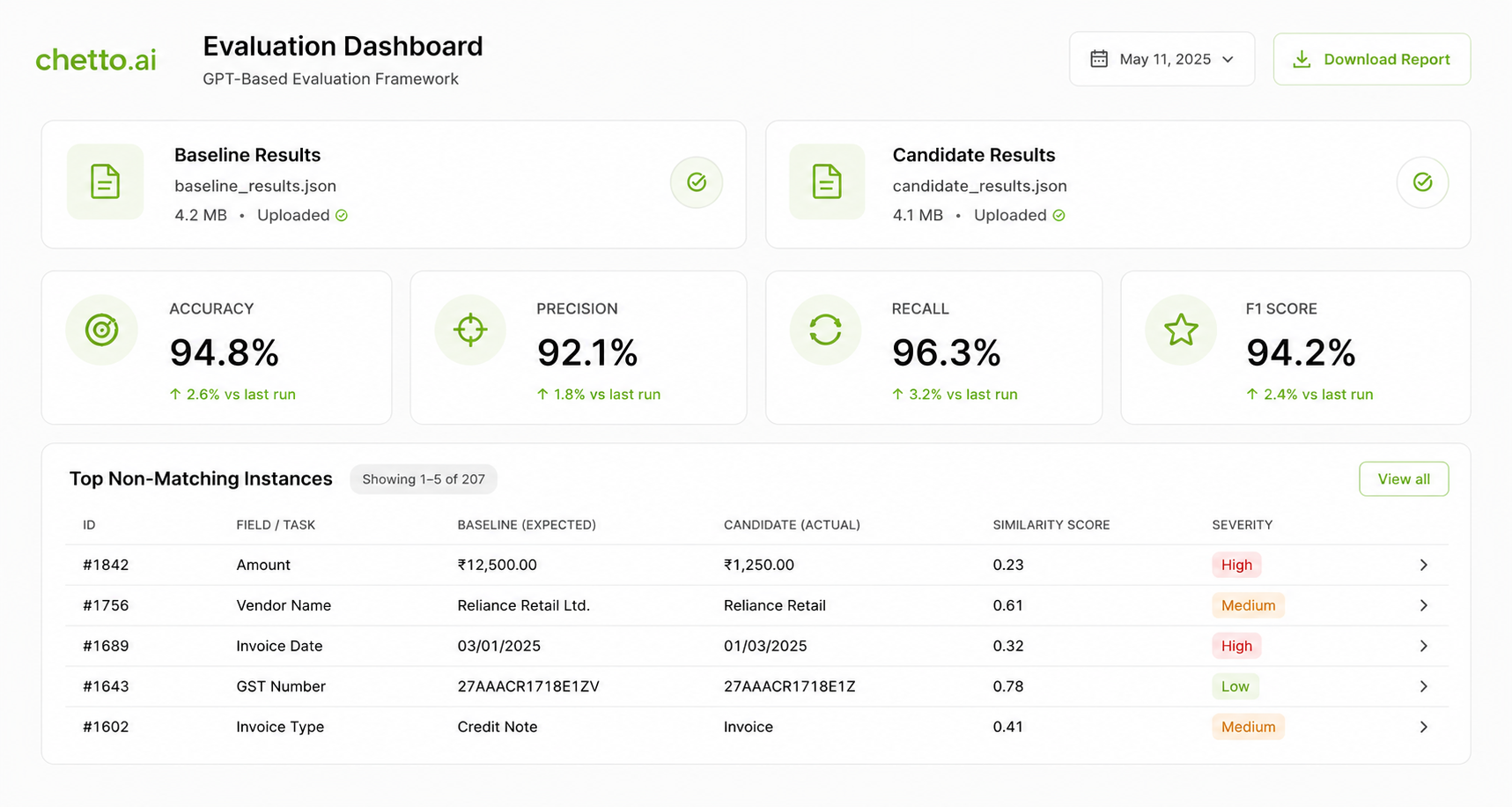
I built a regression-safe evaluation framework to test AI workflow changes before deployment. By using GPT-based semantic matching instead of exact-match comparison, it judges whether outputs are still correct even when the wording differs a reliable basis for experimentation, QA, and controlled rollouts.

0%
Accuracy
0%
Precision
0%
Recall
0%
F1 Score
(Problem)

Evaluating AI systems is fundamentally different from traditional software. Conventional outputs are deterministic and pass or fail on exact assertions; AI workflows produce many valid responses for the same input, so exact string matching flags correct answers as failures simply because they are phrased differently.

  • Did a prompt change actually improve performance?
  • Does a new model version introduce regressions?
  • Is a workflow modification producing better results?
  • Can we safely roll this change out to production?
(Solution)

An automated framework that compares workflow outputs against expected behaviour using GPT-based semantic assessment measuring meaningful equivalence rather than literal text.

Teams run evaluation suites against different workflow versions, compare results, and catch regressions before anything reaches production.

Evaluation framework
(Technical design) Per-case evaluation
Workflow output Expected output GPT evaluator Pass / Fail / Score
01

Evaluation dataset

A curated benchmark of representative inputs and expected outputs common scenarios, edge cases, failure-prone examples, and business-critical workflows held consistent across iterations and model versions.
02

Semantic matching

For each case the workflow generates an output, the expected result is retrieved, and a GPT evaluator scores semantic similarity and task correctness as pass, fail, or a quality score focused on intent, not exact wording.

03

Regression detection

Benchmarks run across baseline and candidate systems production vs. candidate workflows, new prompts, model upgrades surfacing exactly where performance improved or degraded before release.

04

Experimentation & rollouts

Repeatable, measurable evaluation lets teams test changes, compare versions, and validate improvements turning a qualitative review into a data-driven workflow.

4
questions every change must answer before it ships
(Impact)
  • Reduced risk when deploying workflow changes
  • Faster experimentation and iteration cycles
  • Higher confidence in prompt and model upgrades
  • Consistent, objective measurement of quality
  • Controlled feature rollouts backed by evidence
(Key learnings)
01

Semantic correctness beats exact textual similarity evaluation must allow many valid responses rather than enforce rigid matching.

02

Benchmark quality matters as much as evaluation logic; a framework is only as good as the coverage of its test cases.

03

AI evaluation is a product capability, not a one-time project it is essential infrastructure for reliability and safe scaling.

02

Agentic Invoice Extraction & Audio Order Tracking

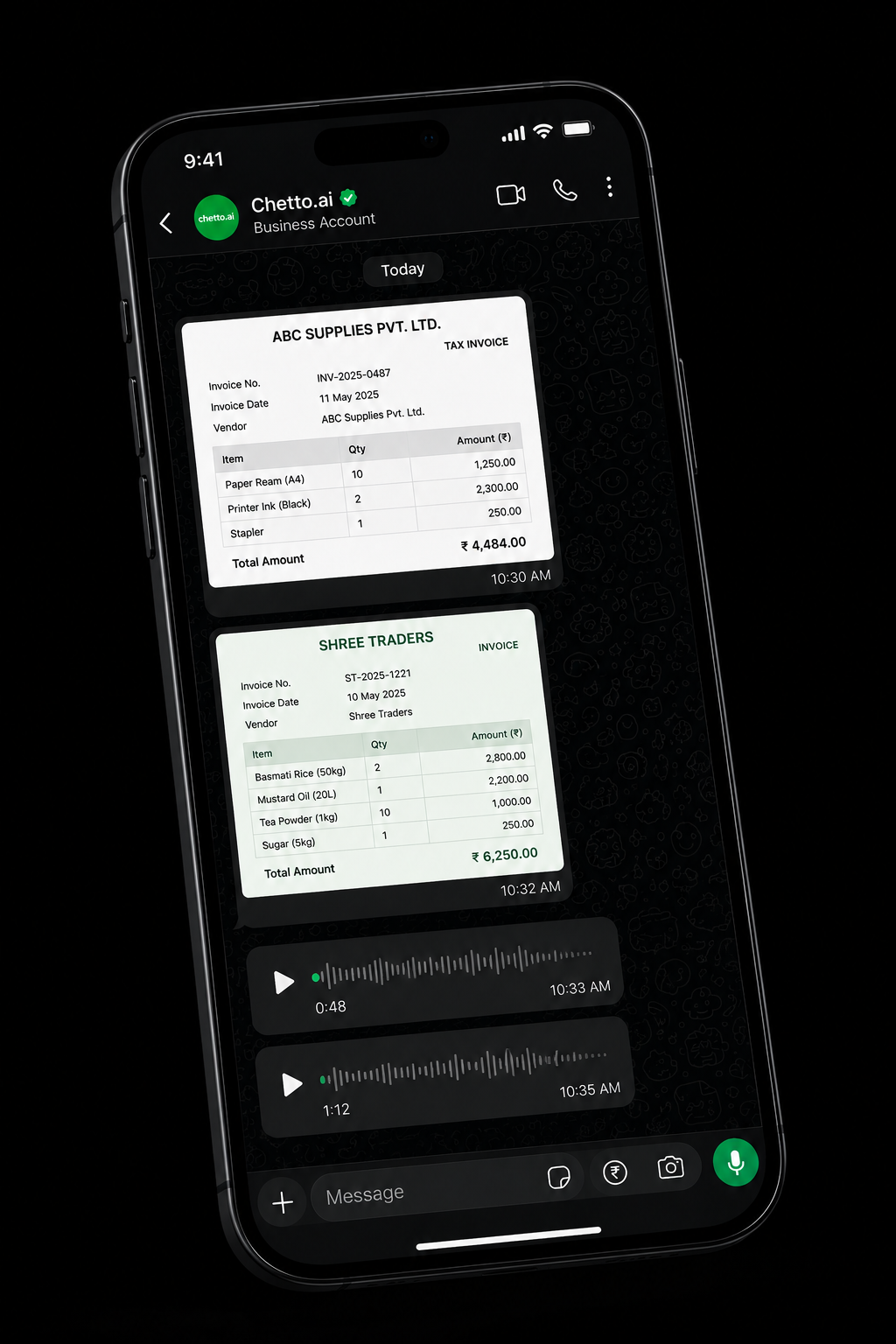
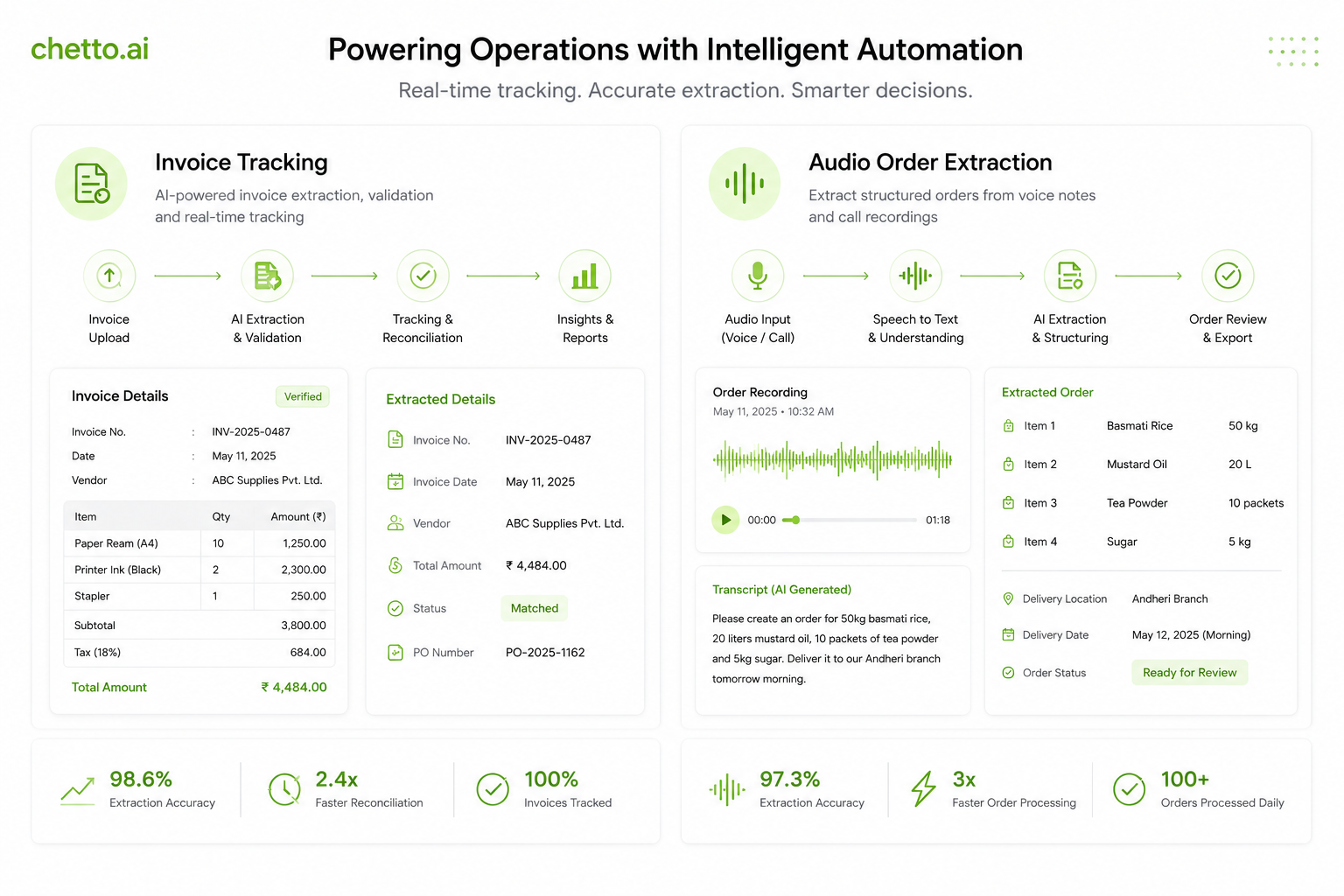
Business operations on WhatsApp arrive as receipts, invoices, and PDFs and increasingly as voice notes dictating orders on the move. An agentic pipeline turns all of it into structured, queryable records.

Vision and audio models read each artifact; reasoning agents extract vendor, amount, date, and line items, then route them into the ledger with a fallback chain that keeps accuracy high on messy, real-world inputs.

Extraction interface
(Problem)

Most of a business’s money and intent hides inside images and audio. Receipts are blurry, invoices are inconsistent, and orders are spoken rather than typed none of it labelled or structured.

  • Receipts and invoices vary wildly in format and quality.
  • Voice orders carry critical detail that text pipelines ignore.
  • Naive OCR fails on dim, crumpled, or tilted photos.
  • Manual entry is slow, repetitive, and error-prone.
(Solution)

An agentic extraction pipeline: images run through vision captioning and OCR; audio is transcribed and parsed for order intent; a reasoning layer structures everything into clean records.

When primary OCR is unsure, the agent falls back to stronger models pushing extraction accuracy from a shaky 60% to a dependable 97%+.

Extraction pipeline
(Technical design) Any input to structured record
Image / audio Caption & OCR Reasoning agent Structured JSON
01

Image captioning

Every image is described in plain language first “a printed receipt totalling ₹1,250” giving downstream steps meaning to work from instead of raw pixels.

02

OCR with fallback

Primary OCR pulls vendor, amount, and date; when a photo is dim or crumpled it escalates to advanced models, lifting accuracy from 60% to 97%+.

03

Audio order tracking

Voice notes are transcribed and parsed for order intent items, quantities, and amounts so spoken orders become structured tasks alongside written ones.

04

Agentic structuring

A reasoning layer turns free text into queryable JSON amount, vendor, date, category and routes it straight into the dashboard.

97%+
extraction accuracy, up from a shaky 60%
(Impact)
  • OCR accuracy improved from 60% to over 97%
  • Receipts, invoices, and voice orders captured automatically
  • Manual expense entry largely eliminated
  • Structured, queryable records from any input type
(Key learnings)
01

Meaning-first captioning makes every later step more robust than working from raw pixels.

02

A fallback chain beats a single model graceful escalation is what makes accuracy dependable.

03

Audio is a first-class input; treating it as an afterthought loses real operational detail.

03

Workflow Simulation Framework

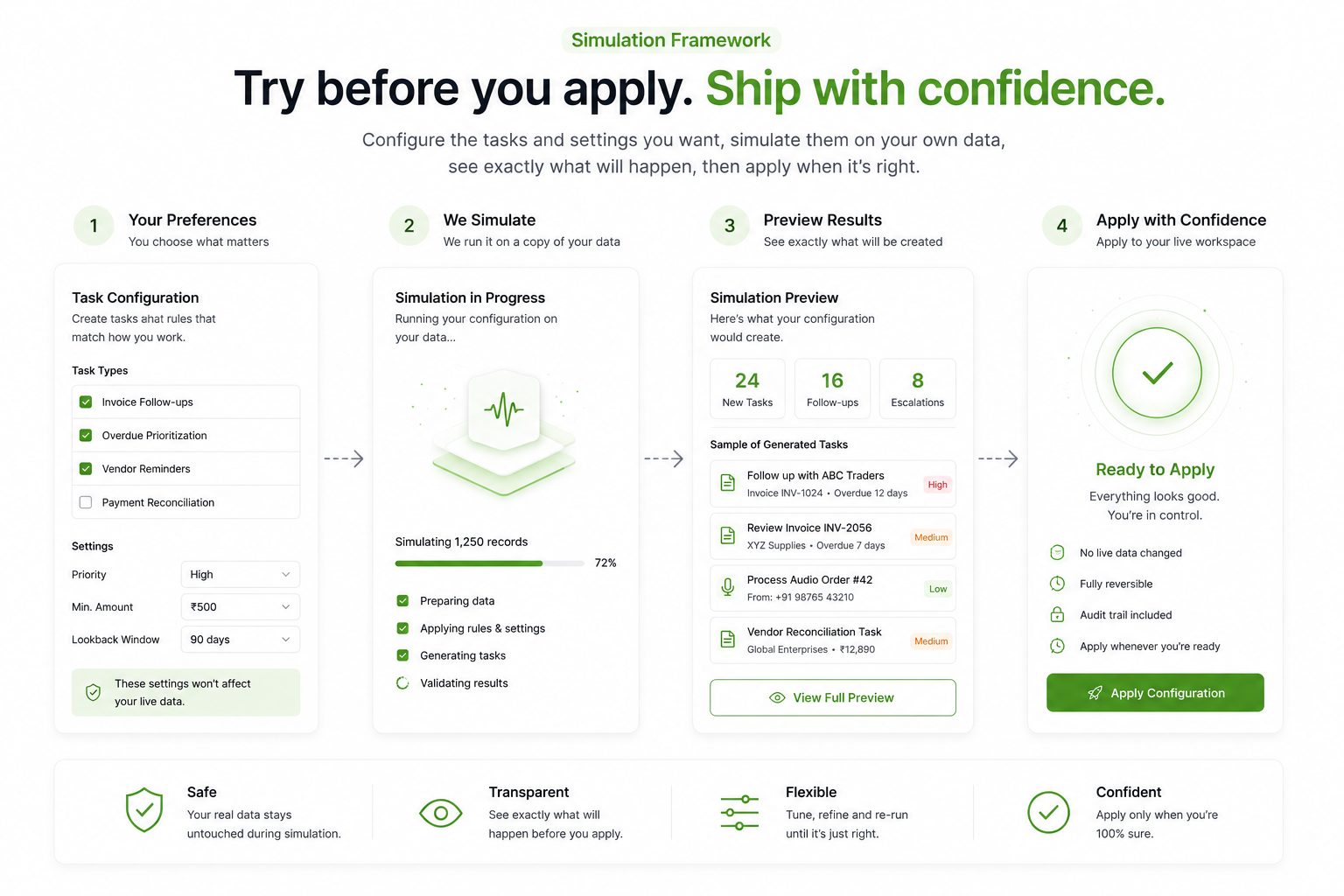
Every business runs differently, so Chetto lets users define the particular tasks they want created and the specific settings that shape them. But applying a new configuration straight to live data is a leap of faith.

The simulation framework lets users try their preferences on their own data first seeing exactly what a setting would produce before it goes live, so they can adjust until it fits and then implement with confidence.

sandbox · your data
Auto-categorize expenses
Create tasks from voice notes
Weekly summary every Monday
Preview on your data →
₹1,250Printer repair · Office
₹4,400Supplies · Inventory
(Problem)

Users need their own tasks, rules, and settings not fixed defaults. But there is no safe way to know how a new preference will behave on their real data until they apply it, and by then it is already affecting live records.

  • Users want custom tasks and rules tailored to how they work.
  • A setting that fits one business misfires for another.
  • Applying an untested configuration to live data is hard to undo.
  • There is no way to preview the outcome before committing.
(Solution)

A simulation mode where users configure the tasks and settings they want and run them against a copy of their own data, with nothing changed for real.

They see exactly what the configuration would produce, tune it until it matches what they expect, and only then apply it to their live workspace.

Settings simulation
(Technical design) Try it before you apply it
Configure Run on your data Preview Apply
01

Custom tasks & settings

Users define the particular tasks they want created and the specific rules and settings that shape them, instead of relying on one-size-fits-all defaults.

02

Run on your own data

The configuration is simulated against the user's real records, so the preview reflects their actual business, not generic sample data.

03

Preview the outcome

Results show exactly what the new settings would produce, so users can compare against current behaviour before changing anything.

04

Apply with confidence

Once the preview looks right, the same configuration is applied to the live workspace, with no surprises and nothing irreversible.

0
guesswork every setting is tried on your own data before it goes live
(Impact)
  • Users test custom tasks and settings before applying them
  • Preferences validated against real data, not assumptions
  • No untested changes pushed straight to live records
  • Confidence to personalize and tweak freely
(Key learnings)
01

Letting users preview on their own data builds trust faster than any amount of documentation.

02

People configure more boldly when changes are visible and reversible first.

03

A safe sandbox turns “I'm not sure” into “show me” and then “apply”.

(03) (More works) © 2025